您现在的位置是:网站首页> 编程资料编程资料
ASP.NET实现图片自动添加水印_实用技巧_
 2023-05-24
567人已围观
2023-05-24
567人已围观
简介 ASP.NET实现图片自动添加水印_实用技巧_
本文实例为大家分享了ASP.NET实现图片自动添加水印的具体代码,供大家参考,具体内容如下
先建一个类,感觉注释已经很详细了,有不懂的欢迎评论
using System; using System.Collections.Generic; using System.Drawing; using System.Drawing.Imaging; using System.IO; using System.Linq; using System.Web; namespace shuiyin { public class Water : IHttpHandler { /* 这个IsReusable的true是可以提高效率但是,会线程不安全 IHttpHandler实例可以再次使用 false,会安全一些,效率会低一些 IHttpHandler的实例就不能使用 */ public bool IsReusable => true; //水印 private const string Water_Url = "~/Images/watermark.png"; //没有图片的时候使用 private const string None_Picture = "~/Error/default.jpg"; public void ProcessRequest(HttpContext context) { //获取图片的物理路径 string path = context.Request.PhysicalPath; Image image; //如果我当前项目中有这个图片,就可以进行加水印操作 if (File.Exists(path)) { //获取指定的图片(要添加水印的图片) image = Image.FromFile(path); //再找到,要添加的水印 Image image_Water = Image.FromFile(context.Server.MapPath(Water_Url)); //使用画图的类,获取图片 Graphics graphics = Graphics.FromImage(image); //画图方法,第一个参数就是要添加的水印 graphics.DrawImage(image_Water, //第二个参数是一个坐标的问题,从x1,y1坐标开始,绘制的水印的长度和宽度, //一共四个参数,x1,y1,水印的长度,宽度 new Rectangle(image.Width - image_Water.Width, image.Height - image_Water.Height, image_Water.Width, image_Water.Height), //从上一个参数获取的位置开始作为新的区域 //新区域的0,0开始,也是宽度和长度, //最后一个参数就是,像素的问题,多少像素 0, 0, image_Water.Width, image_Water.Height,GraphicsUnit.Pixel); //使用完了,把两个图片的资源都释放掉 graphics.Dispose(); image_Water.Dispose(); } else { //这里是如果没有指定的图片的话,就用一个找不到的图片去代替 image = Image.FromFile(context.Server.MapPath(None_Picture)); } //新图片的类型 context.Response.ContentType = "Image/Jpeg"; //把新图片进行保存,输出流和格式 image.Save(context.Response.OutputStream, ImageFormat.Jpeg); //使用完保存,释放掉图片的资源,结束 image.Dispose(); context.Response.End(); } } }修改配置文件

path是加水印图片的地址,type是那个类的路径:
也就是命名空间 .(点)类名
一个简单的web窗体
<%@ Page Language="C#" AutoEventWireup="true" CodeBehind="ThreePicture_Water.aspx.cs" Inherits="shuiyin.ThreePicture_Water" %>
效果图
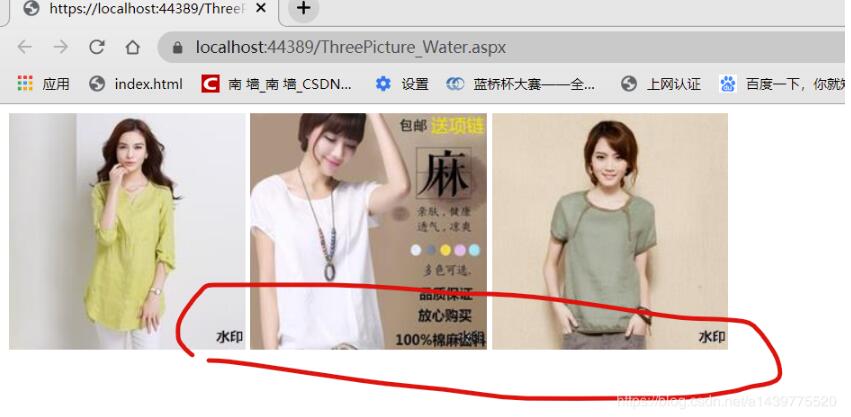
以上就是本文的全部内容,希望对大家的学习有所帮助,也希望大家多多支持。
您可能感兴趣的文章:
相关内容
- ASP.NET Core自定义中间件如何读取Request.Body与Response.Body的内容详解_实用技巧_
- asp.net mvc core管道及拦截器的理解_实用技巧_
- .net core 3.1在iis上发布的踩坑记录_实用技巧_
- 关于.NET Attribute在数据校验中的应用教程_实用技巧_
- Asp.net Core中实现自定义身份认证的示例代码_实用技巧_
- 使用VSCode开发和调试.NET Core程序的方法_实用技巧_
- ASP.NET Core MVC获取请求的参数方法示例_实用技巧_
- ASP.NET中AJAX的异步加载(Demo演示)_实用技巧_
- ASP.NET通过更改Url进行页面传值的实现代码_实用技巧_
- 不可或缺的ASP.NET内置对象小结_实用技巧_